Posts tonen met het label Tutorial's. Alle posts tonen

woensdag 17 oktober 2012

Theme  ;  Challenge TheThreeMuses  / VINTAGE.
 
I had a hard time coming up with a idea for this theme
and actually this is my second piece.
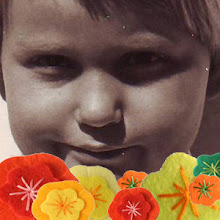
I didn't threw the first one away but I wanted to share a more personal image with you which I thougt would suit this theme also.
When I was recently in the states, we also visited the Amish people in Pennsylvania. Their "vintage" way of life intrigues me and I loved meeting these kind people.
I took this photo of my DH Johan when we bought some fruit and drinks in the store and after we visit their bakery and stables as well.

Because we couldn't pay with our creditcard, Johan (still struggling with the foreign currency) opened his purse and the nice lady was so helpfull to grab the money by herself.  LOL
*****************************************
To give this photo an even older look, I followed a tutorial again.
Named ; the Nashville effect which you can find → HERE ←
Ofcourse it would have been easier to use a free online Photoshop Action
but than it would have been no challenge to me !!
It looks rather vintage don't you think ?
If only Johan had worn a farmers shirt !!  :-))

zondag 11 maart 2012

Theme ; Challenge TakeAWord / GREEN

For this weeks theme I've made a quick photomanipulation.
It's really easy and when you want to try it once HERE is the link.
Have Fun !! And I thank you hearty for your time ♥

woensdag 20 juli 2011

Today no challenge...no shopupdate...no "stress" or deadline.
Today it was playtime with photoshop ;)
I found a fantastic VIDEO tutorial I could not resist :)
A Watercolour / Ink Blot Effect HERE (psd.tutsplus.com)
SAMPLE :

Credits ; Watercolor texture HERE
And my final result; a digital journal page,

Credits ; Mostly images from my latest collage sheets
Tassels are from Jaguarwoman

dinsdag 19 juli 2011

Theme ; Challenge The Three Muses / ORIENTAL

Inspired by the art of *STROODY (Bob deviantart), JAGUARWOMAN and the summer gardens of MELKOR, I decided to make my own premade background.
It's not so difficult as it seems, the only thing you need is time and patience :)

CREDITS:
First I searched for relevant images on the Internet !!

Okay, that took me an hour or so :)
Then it was playtime !!! (you can CLICK to Enlarge.)
Printscreens "WORK IN PROGRESS"

You see ?
Did I say to much ?
I'ts realy possible to create these premade backgrounds by yourself and perhaps you want to try it once. As you wish you can grab this
FREE PNG COLLAGE SHEET with most of the elements I've used.
TO DOWNLOAD
Click TWICE on the picture to get a larger image!!
Right click and "save to" your computer. SUCCES !!

OOPS...almost forgot to mension...The POSER found Here
and the Cherry Tree PNG Here

dinsdag 26 oktober 2010

Theme Challenge The Digital Whisper / Cauldron.
Feel free to join our group !!
Or click on the images to enlarge.

All the credits and Screenshots of this "Work in Progress"
1) Preparing the background....

2) Provided image cauldron....

3) The finishing touch....

vrijdag 19 februari 2010

Theme; Challenge by Art Creations Friday.
I had a hard time coming up with ideas for this background so I've decided to manipulate it. I hope it's forgiven Wil ?
How I did this you can read on the tut. that is incluced with my screenshots "Work in Progress".
At the end I've add a filter/render/spotlight to create more sphere.

Perhaps there is someone with a title/text idea for this image?
I has so much fun with this woman hihi.

a little tutorial and "Work in Progress"

Thanks kindly for looking. Rian xxx

woensdag 10 februari 2010

Theme; Challenge by The Tree Muses / Postage Stamps
It had been perhaps easier when I had used a real postage stamp to create this weeks entry !
But then...the challenge would have been not so nice to make for me as it was now. And for this reason I "freubelde" a while. :-)
How I did this you can see below. (feel free to click & enlarge the tutorial)

TIP
How I typed the round text into the stamp you can read HERE
CREDITS and a few screenshots "Work in Progress"

And my final result...

Thanks kindly for looking xxx Rian

woensdag 20 januari 2010

Theme; Challenge at The Three Muses / Something in the Air.
It's a long time ago that I used one of my favorite BBW models in my art.
But here she is again...Fabulous HILDA !!

Credits

Work in Progress / Tutorial

******** ********
About the Hot Air Balloons.
The images are found in a Russian!! library and they are free to use.
I translated it to be sure but I DON'T claim them as my own !
I thought "let's separate them from the background - cut them out - and make a free collage sheet". Perhaps that you like it.

Feel free to enlarge. The sheet is available as a PSD file ; FULL SIZED as from tomorrow at my website.
Enjoy.

vrijdag 15 januari 2010

Theme ; Challenge by Art Creations Friday.
This time I took the chance of making a 'spooky' brush of the photograph provided. I've never did that before with a challenge.
When you enlarge the second image of this entry, you can read how to try this by yourself in photoshop.
Ofcourse there a many (different) tutorials to find on the internet about this subject, but as always...i did it on my manner.
Thank you kindly for looking xxx

Credits / Tutorial Brushmaking

donderdag 3 december 2009

Another "BORN TO BE WILD" experiment.

I followed a part of a new tutorial that i found > HERE <
Ofcourse "freubel" took it over at the end.

dinsdag 3 november 2009

Creating a layered Threshold effect in Photoshop.
I found the (very easy !!) tutorial > HERE < (www.layersmagazine.com)
Feel free and click to enlarge.

A different result.

vrijdag 9 oktober 2009

Theme ; Challenge by Art Creations Friday.
For me it's always fun to learn more and more about photoshop when i'm making a tutorial that i found on the internet.
As you know i've use them often to take part at a challenge !!
This time i created a Super Cool Watercolor Effect in 10 steps!!
If there is someone who would have interest ?? You can find it > HERE <
(http://abduzeedo.com)
(and for the ladies of ACF ; Thanks Pepeetje !!)

After i followed the tutorial i've add a few extra textures to give my entry a more personal touch. You can watch that by enlarge my
WORK IN PROGRESS & CREDITS.

donderdag 1 oktober 2009

Theme ; PHOTO MANIPULATION
Playing around with a tutorial of Photoshop Creative.nl

Credits & Work in progress.
Feel free to ENLARGE the images.

vrijdag 7 augustus 2009

Today i've tried a few different things with a new tutorial that i couldn't resist. Create Cool Watercolor Effects in Photoshop ! > CLICK < (PSD TUTS ; one of my favourite websites !)
If you want to try is also, then download FIRST this brushes > CLICK < ( a freebie from Bittbox )
Credits for the lady Deliciarum.info (another fav.)

zaterdag 4 juli 2009

Theme; Challenge by Artarazzi, a vintage lady called Winnie !

A long time I had to think what to do with this photo and when i'm be very honest (I always am !) I REALY DIDN'T NOW !
Yep, for the first time I had a complete "black-out" what to do. This photo was so difficult to work with that I first decided to search around the internet for a tutorial.
One hour later, I still had no idea, suddenly I saw by accident a brilliant picture ! Hurraayy...but HOW to make it ??
Well ..my nickname is FREUBEL hey and there she GOOO'S. LOL
*******
For the background I used a personal photo of the KINDERDIJK here in the Netherlands.
A famous piece on earth !


CREDITS


Just click on the pictures for a larger view
and thanks for looking

donderdag 2 juli 2009

Theme ; Tutorial.
How to create a colourful photo with fabric textures like this;


woensdag 17 juni 2009

Theme ; Challenge The Three Muses, OPEN DOOR.
Have you ever experienced that the toiletdoor was accidentally OPEN ????
Anxious isn't it ? Bet that you got Spanish suffocated.

Tutorial OPEN DOOR


Work in Progress & CREDITS

dinsdag 16 juni 2009

Theme ; Tutorial. How to create your own Art Nouveau Affiche like this ;

Things you need. (also credits)
1) Arabesque Brushes. You can find them > HERE < Thanks to ElementsUnleashed by DeviantArt.
2) Distressed Brushes. You can find them > HERE < Thanks to Scully by DeviantArt.
3) A Art nouveau ladie from Alphonse Mucha > HERE < Thanks to Deliciarum.info
4) A few elements from the FREEBIE-kit. Thanks to Jaelop designs. > HERE <
5) Sea Shell. You can find it > HERE <
TUTORIAL Part 1


TUTORIAL Part 2

woensdag 10 juni 2009

Just in a grungy mood :-)


Tut. & Credits

maandag 18 mei 2009

Theme ; Tutorial
A basic simple Photoshop trick how to cut out a face and cover it with a texture.
* Just click on the pictures for a larger view.